Extract audio from video without uploading it
Pull the soundtrack out of any video as MP3, WAV, OGG or M4A. The video is opened by your browser, the audio is decoded and re-encoded on your computer, and you download the result — no upload, no server, no waiting in a queue.
Works with phone videos, screen recordings, lectures, interviews and stream recordings you have downloaded.
Runs in your browser — nothing is uploaded
Working on audio for a live show? Continue to Studio setup when you are ready to prepare a broadcast. Your extracted file stays on this device.
Explore Studio setupHow audio extraction works
- 01
Drop the video in
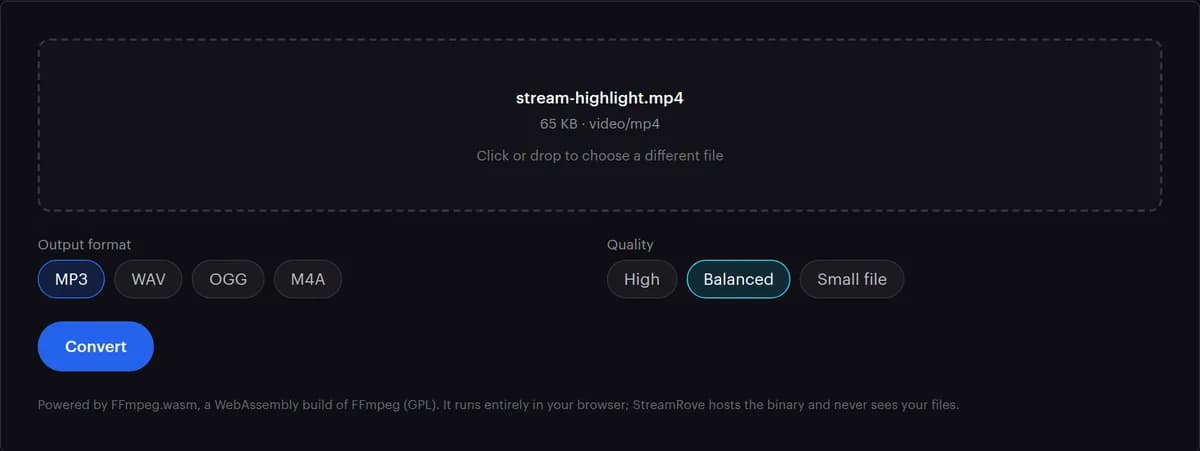
Drag it onto the box or click to choose it. MP4, MOV, MKV, WebM, AVI and most other formats open. The picture is skipped, never decoded: what takes time is the length of the video and the size of the file.
- 02
Choose the audio format
MP3 is selected to start with and plays everywhere. M4A suits phones and Apple devices, OGG suits web pages, and WAV is the one for an editing program.
- 03
Pick a quality
Balanced is selected for you. High keeps more detail and Small file makes a lighter download; the table below shows what each one weighs for an hour of sound. WAV has no quality choice.
- 04
Press Convert
The first time, the page fetches the converter, about 30 MB, and keeps it for next time. A large video is read into memory before the percentage starts to move, so give it a moment.
- 05
Download the sound
The file takes the video's name, with spaces turned into underscores and a new ending: .mp3, .wav, .ogg or .m4a. Its size shows next to Download.
- 06
Play it before you delete the video
Listen to the start, the middle and the end. A video with several sound tracks gives you only one of them, and it is better to find that out while the original is still there.
What the sound of a one-hour video becomes
Every choice, with the exact encoder settings the extractor uses and the size of one hour of sound. The length of the video decides the size of the file; the picture adds nothing, because it is left behind.
| Format | Encoder | High · Balanced · Small file | One hour of sound | Use it for |
|---|---|---|---|---|
| MP3 | LAME MP3, constant bitrate | 320 · 192 · 128 kbps | 144 · 86 · 58 MB | Podcasts, talks and anything you will share |
| M4A | AAC, arranged to start playing before it has fully loaded | 256 · 160 · 96 kbps | 115 · 72 · 43 MB | Listening on phones and Apple devices |
| OGG | Vorbis, aiming at the bitrate on average | 160 · 96 · 64 kbps | 72 · 43 · 29 MB | Web pages and games |
| WAV | 16-bit PCM, no compression | One setting | 635 MB at 44.1 kHz stereo, 691 MB at 48 kHz | Editing: cutting, removing noise, mixing with music |
One hour = bitrate × 3,600 seconds ÷ 8 bits per byte. For 192 kbps: 192 × 3,600 ÷ 8 = 86,400 kB, about 86 MB. WAV stores 44,100 samples × 2 bytes × 2 channels = 176,400 bytes every second, about 635 MB an hour; at 48 kHz, a common rate for video sound, it is 691 MB. MP3 hits these figures; M4A and OGG come close.
Extraction problems
No audio in the result
If the video has no sound track at all, the extractor stops with an error saying the output 'does not contain any stream'. If you get a file that plays silent, the video was recorded with its sound off: screen recorders often need the microphone or system sound switched on before you record.
Only one voice comes through
Some recorders put each person, or the microphone and the game, on separate tracks. The extractor keeps one: the track the file marks as its default, and among equals the one with the most channels. Export the other tracks from a video editor.
It sounds worse than the video
The sound inside a video is usually compressed already, and Small file compresses it again. Choose High, or WAV if the sound is going into an editor.
It fails on a large file
The page warns above 1.5 GB. The whole video is held in your browser's memory while its sound is taken out, and a very large file can run out partway. Trim or split the video and try again.
It takes a while to start
Before any sound comes out, the browser reads the whole video into memory, and a big file spends that time with no percentage showing. After that the work runs on one processor core: close other heavy tabs and leave this one open until it finishes.
The download will not play
Try another player: VLC opens all four formats. For an iPhone, extract M4A or MP3, the two formats every phone plays.
Ways to get the sound out of a video
Pick by what matters most to you: the exact original sound, speed, or keeping the file private.
| Way | The sound you get | Where the video goes | Effort | Good when |
|---|---|---|---|---|
| This extractor | Re-encoded at the quality you pick, or uncompressed WAV | Nowhere: it stays on your computer | Drop, pick, download | You want a common format quickly, without installing or uploading anything |
| FFmpeg on the command line, copying the track | The original sound, bit for bit, when the new file type can hold it | Nowhere | Install FFmpeg and type one command | You need the untouched original, or a whole folder done at once |
| A video editor's audio-only export | Whatever its export settings say | Nowhere | Open a project and set up the export | You also want to cut or clean up the sound |
| Upload-based converter websites | Usually re-encoded, at their settings | To their server and back | Upload, wait, download | The video is not private and your computer is slow |
| Recording the sound while the video plays | A copy of a copy, with any system sounds that play along | Nowhere | As long as the video itself | Almost never: only when the file opens nowhere else |
Why extract audio locally
Your recordings stay private
Interviews, meetings and lectures do not belong on a converter site's server. Here they never leave your computer.
It is faster than uploading a video
Video files are big; the sound inside them is small. Uploading the whole video to get the small part out is the slow way round.
Encoding you choose
Real LAME, AAC and Vorbis encoders with three quality settings each, every one a fixed bitrate listed on this page, or uncompressed WAV for editing.
Nothing is uploaded
The whole job runs in your browser. We never receive the video, the audio or the filename; closing the tab leaves nothing behind anywhere.
Cutting clips from a stream?
StreamRove's Clips section works on the video itself. Upload a file or pick a recording from Storage, mark Start here and End here, and export a vertical 1080 × 1920 clip or the original framing, sound included. Recording a broadcast needs a paid plan, and your plan sets how many clips you can export each month.
Tips for cleaner extractions
- Going into an editor? Choose WAV. You can always compress later, but you can never get back what compression threw away.
- For speech, Small file is plenty: an hour-long lecture as a 128 kbps MP3 is about 58 MB, against about 86 MB at Balanced.
- Trim long stream recordings to the part you need before you drop them in. The extractor takes the whole soundtrack, and a shorter video loads into memory faster.
- Need the opposite, a video without its sound? Remove audio from video drops the sound track and copies the picture exactly as it is.
Frequently asked questions
Is it free?
Yes, without sign-up, watermarks or a limit on how many videos you use. The engine is open-source FFmpeg.
Is the audio quality reduced?
WAV adds no new compression: the soundtrack is decoded and stored as 16-bit PCM, the depth of a CD. MP3, M4A and OGG compress it again; at High, most people cannot hear a difference. No setting can make the sound better than the video's own track.
Can I extract audio from a YouTube or TikTok video?
Only from a file you have on your computer. This tool does not download from other sites, and for other people's videos, check you have the rights first.
Does it upload my video?
No. The video is read inside your browser and its sound is converted there. Watch your browser's network tab if you like: after the engine download, nothing carrying your file leaves the page.
What about very long recordings?
The tool sets no length limit of its own. Above 1.5 GB the page warns you, because the whole video sits in your browser's memory while its sound is taken out. For a long meeting or lecture, trim or split the video first.
My video has several sound tracks. Which one do I get?
One. The extractor takes the track the file marks as its default; when that does not settle it, the one with the most channels, and then the first. In a recording with the microphone and the game on separate tracks, you get one of them, not both. Use a video editor to export the other.
Can I extract just part of the video?
Not in this tool: it takes the sound of the whole file. Trim the video first, or cut the audio afterwards in an editor. For a StreamRove recording, Clips can cut out the part you need, sound included, and you can extract from the clip.
Which format is best for a podcast?
MP3 at Balanced, 192 kbps, is the safe choice for a podcast feed. For a voice-only recording, Small file at 128 kbps makes the file a third smaller. If you plan to clean up noise or edit, extract WAV and compress after editing.
Does it work with iPhone videos?
Yes. iPhone videos are MOV files, often with HEVC pictures. The picture is skipped either way, so its format does not matter, only the sound track.
Can I get the sound of a StreamRove recording?
Yes. Recordings arrive in Storage as MP4 files: download one and drop it here. Recording a broadcast needs a paid plan; see pricing.