OBS multistream plugin that uploads your stream once
StreamRove for OBS is a free, open-source dock for OBS Studio on Windows, macOS and Linux. Sign in with a code, pick a stream, and the dock fills in OBS's server and key, starts the stream and lets you switch platforms on and off. OBS uploads one stream, and StreamRove passes it on to YouTube, Twitch, Kick, Facebook and any RTMP server.
Aitum Multistream and obs-multi-rtmp add outputs to OBS, so each platform costs you another full stream of upload. The dock keeps OBS on one output. Below: how the three compare, how to install on each system, and what the dock can't do.
What changes when OBS sends one stream
Your upload doesn't grow with each platform
A multi-output plugin sends a full stream from your PC to every platform. Three platforms at 6,000 kbps need about 26 Mbps of upload that way. With the dock, OBS sends one stream to StreamRove and needs about 8.8 Mbps, whether it reaches two platforms or eight.
Nothing to copy and paste
You sign in by approving an eight-character code in your browser. Use this stream in OBS then writes the server and stream key into OBS for you. The keys for YouTube, Twitch and Kick are read when you connect those channels on StreamRove.
Platforms on checkboxes
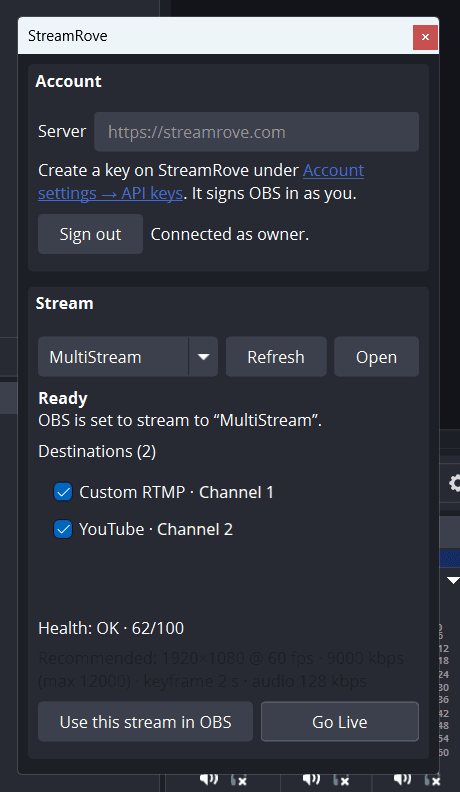
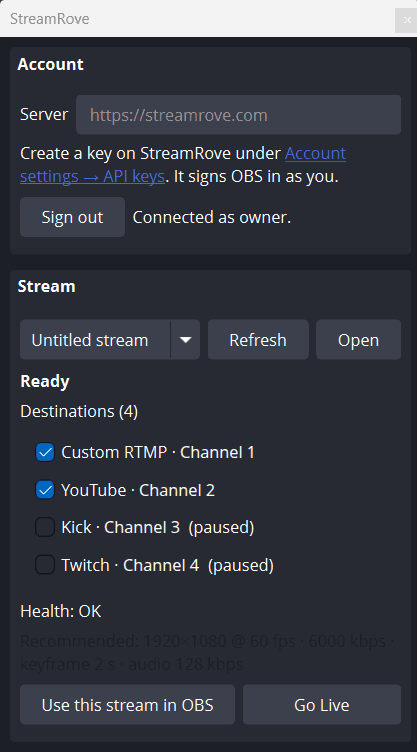
Every destination of the stream is listed in the dock with a checkbox. Untick one and that platform stops getting the stream; the others carry on. The same switches are on the stream page, so you can change them from your phone too.
A sign-in key that can do very little
Signing in creates a key for that one computer. It can read your streams, their health and the recommended settings, and switch destinations. StreamRove refuses it anything else: it can't delete, change your account, invite people or open billing.
What the dock does inside OBS
Use this stream in OBS
Sets Settings → Stream to Custom with your stream's RTMPS server and key, the same thing you'd do by hand, without copying anything.
Go Live and Stop Streaming
Starts or stops OBS's stream from the dock. If the stream wasn't applied to OBS yet, the dock applies it first.
Destinations
Lists the platforms attached to the stream, each with a checkbox that turns it on or off on StreamRove.
Health every 10 seconds
While you're live, the dock shows the stream's status, its 0–100 health score and the latest problem explained in plain words.
Recommended settings
Shows the bitrate, keyframe interval and audio bitrate that suit all your platforms. It doesn't change Settings → Output; you type them in yourself.
Open in the browser
One click opens the stream's page on StreamRove, for recordings, chat, the backup screen and everything else the dock doesn't show.
StreamRove for OBS or a multi-output plugin?
Aitum Multistream and obs-multi-rtmp are free plugins that add outputs to OBS. The StreamRove dock keeps one output and the copies are made on our servers. Each wins on some rows.
| StreamRove | Aitum Multistream or obs-multi-rtmp | |
|---|---|---|
| Upload for three platforms at 6,000 kbps | ✓ About 8.8 Mbps: one stream | About 26 Mbps: three streams |
| Price | Free plugin; multistreaming needs a StreamRove plan, and the Sandbox plan for testing is free | ✓ Free, with no account |
| Encoding on your PC | ✓ One encode | One if every output shares OBS's encoder, plus one for each output with its own |
| A different bitrate per platform | — No: one stream, one bitrate | ✓ Yes, by giving an output its own encoder |
| A separate vertical canvas | — Not from the dock | ✓ Aitum Multistream, together with Aitum Vertical |
| Stream keys | ✓ Filled in by the dock | Pasted into each output |
| Turning a platform off while live | ✓ A checkbox in the dock, or a switch in any browser | Stop that output in OBS |
| If your PC or internet drops | Holding screen on Control and up; Signal alerts on every plan | Every platform goes offline |
| Delay before the platforms | One more server on the way | ✓ None added: OBS sends straight to each platform |
How to set up the OBS plugin
Six steps, once. After that, going live is one click in the dock.
Download it
Quit OBS, then get the file for your system from the releases page: the installer for Windows, the .pkg for macOS or the .deb for Linux.
Install it
Run the file. Windows asks for an administrator password and macOS needs a right-click on the first run; the table below says why.
Open the dock
Start OBS and choose Docks → StreamRove. You can drag the panel next to your scenes or leave it floating.
Sign in
Click Sign in. Your browser opens StreamRove and shows a code; approve it while you're signed in. Nothing is typed into OBS.
Pick a stream and use it
Choose a stream from the list and click Use this stream in OBS. No stream yet? Create one on StreamRove, connect your platforms under Your Channels, then click Refresh in the dock.
Go live
Set Settings → Output to the numbers on the dock's Recommended line, then click Go Live. Tick the platforms you want; health starts showing within 10 seconds.
Installing on Windows, macOS and Linux
Quit OBS before you install. Every file is on the releases page.
| System | File | What to expect |
|---|---|---|
| Windows | The installer (.exe) | It asks for an administrator password, because OBS reads plugins from C:\ProgramData\obs-studio\plugins, a folder shared by every user. The installer isn't code-signed yet, so SmartScreen warns on the first run: choose More info, then Run anyway. Remove it later under Settings → Apps. |
| Windows, portable OBS | The .zip | Portable OBS only reads its own folder. Put obs-streamrove.dll in obs-plugins\64bit inside the OBS folder, and the contents of data in data\obs-plugins\obs-streamrove. |
| macOS | The universal .pkg | Runs on Intel and Apple silicon Macs. It isn't notarized yet, so Gatekeeper blocks a double click: right-click the file, choose Open, then Open again. |
| Linux | The .deb (x86_64) | Install it with your package manager. On other distributions, build it from source with the steps in the README on GitHub. |
The packages are built against OBS 31.1.1 and need OBS 31.1 or newer. On OBS 30, building from source works.
Which multistream plugin should you install?
Aitum Multistream
Free and open source (GPL-2.0), made by Aitum, who also make Aitum Vertical. Each output either reuses OBS's main encoder or gets an encoder of its own, and with Aitum Vertical installed it can stream a second, vertical canvas as well. Every output is a full stream from your PC, so check your upload against the total with the bitrate calculator first.
obs-multi-rtmp (Multiple RTMP outputs)
Free and open source (GPL-2.0), by sorayuki. It was first written for VTubers, which is why its homepage is in Japanese. Each target gets its own server and key, and can share OBS's encoder to save CPU or use a separate one with its own bitrate. Its GitHub releases have builds for Windows, macOS and Linux. The upload cost is the same as Aitum's: one full stream per target.
When a local plugin is the better pick
Your upload is several times your bitrate, you want a different bitrate on each platform, or you stream a vertical canvas. Then a local plugin does the job with no account and no plan. The same goes for Twitch's Enhanced Broadcasting, which needs OBS's own Twitch service; the dock switches OBS to Custom.
When the StreamRove dock is the better pick
Your upload is what runs out first, as on most home lines and venue Wi-Fi. There, one stream out can be the difference between a clean picture and dropped frames. You also stop pasting keys and can switch platforms from your phone, and StreamRove keeps an eye on the stream's health. Paid plans add recordings, and Control and up add a holding screen if OBS drops. See OBS settings for multistreaming for the encoder values.
A computer with no browser
On a computer with no browser, choose Use an API key instead and paste a developer key from Account settings → API keys. Unlike the sign-in key, a developer key can do whatever its owner can, so keep it to yourself.
The dock's language
The dock follows OBS's language and has English and Turkish labels. In any other language, its buttons appear in English.
Frequently asked questions
Is StreamRove for OBS free?
Yes. The plugin is free and open source under GPL-2.0. Sending the stream on to several platforms happens on StreamRove and needs an account: Sandbox, the free plan, is there for trying it out, and the pricing page lists what each plan includes.
What is the best multistream plugin for OBS?
It depends on what runs out first. If it's your upload, the StreamRove dock, because OBS sends one stream however many platforms you add. If you have upload to spare and want a vertical canvas or a different bitrate per platform, Aitum Multistream. If you want a small free plugin that only adds RTMP targets, obs-multi-rtmp.
Does the plugin change my OBS output settings?
No. Use this stream in OBS changes only Settings → Stream: the service, the server and the key. The Recommended line shows a bitrate, keyframe interval and audio bitrate for your platforms, and you type them into Settings → Output yourself.
I installed it but there's no StreamRove dock in OBS. Why?
OBS didn't load the plugin. On Windows it has to be in C:\ProgramData\obs-studio\plugins, not in your AppData folder, and portable OBS needs the .zip placed by hand. Also check your OBS version: the packages need 31.1 or newer. Then look under Docks → StreamRove again.
Why do Windows and macOS warn me during the install?
The Windows installer isn't code-signed and the macOS package isn't notarized yet. On Windows choose More info, then Run anyway. On macOS right-click the .pkg, choose Open, then Open again. The source is public on GitHub if you'd rather build it yourself.
Is it safe to sign in from OBS?
The dock never sees your password. It gets its own key for that computer, which can read your streams and switch destinations and nothing more; StreamRove refuses it deleting, account changes, invites and billing. It's listed under Account settings → API keys, where you can revoke it. The dock keeps its settings in OBS's plugin config folder in plain text, the way OBS keeps stream keys.
Can I stream to a custom RTMP server with it?
Yes. Add the server and key on StreamRove as a Custom RTMP destination and it appears in the dock with your other platforms. Facebook and LinkedIn are added the same way, with a pasted server and key.
Will viewers see a longer delay?
The stream goes through one more server before the platforms, so it can arrive slightly later than a direct stream. The platforms' own delay is usually larger. We don't quote a fixed figure for the extra hop.
Keep reading
From the blog
Install the dock and go live from OBS
Download the plugin, sign in with a code and press Go Live. You add your platforms once, on StreamRove.
Sign up for free