How to Stream on Twitch: Setup, OBS Settings and Bitrate
November 11, 2026 · StreamRove Team
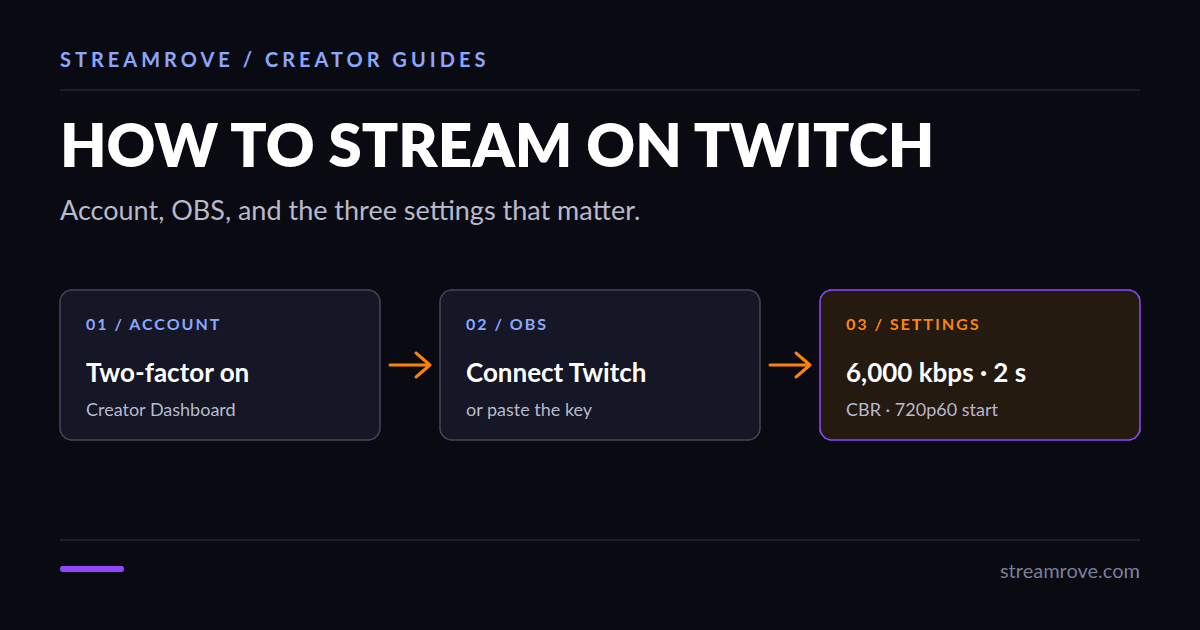
To stream on Twitch you need a Twitch account, a program that sends video (OBS is free and the usual choice), and an upload speed of at least 5 Mbps for a 720p stream. Setup takes about twenty minutes. Most of that is getting three settings right.
Prepare the account
Create an account at twitch.tv and turn on two-factor authentication under Settings → Security and Privacy. Twitch can hide your stream key or block streaming until two-factor sign-in is on, so do it first.
Then open the Creator Dashboard and fill in a stream title and a category. The category decides where people find you in Browse, so pick the game or topic you will actually show.
Connect OBS
Download OBS Studio from obsproject.com. On first launch, the auto-configuration wizard asks what you will use it for. Choose streaming, pick Twitch and connect your account. That fills in the server and the key for you.
If you'd rather paste the key by hand, our guide on where to find your Twitch stream key shows where it is.
The three settings that matter
Open Settings → Output and switch Output Mode to Advanced.
Bitrate
Twitch's standard limit is 6,000 kbps. Higher is not better if your connection can't hold it: viewers get buffering. Twitch doesn't promise lower-quality versions of every channel, so a viewer on a weak connection may only get your full bitrate or nothing. A rough guide: 3,000 kbps for 720p at 30 fps, 4,500 kbps for 720p at 60 fps, and 6,000 kbps for 1080p at 60 fps.
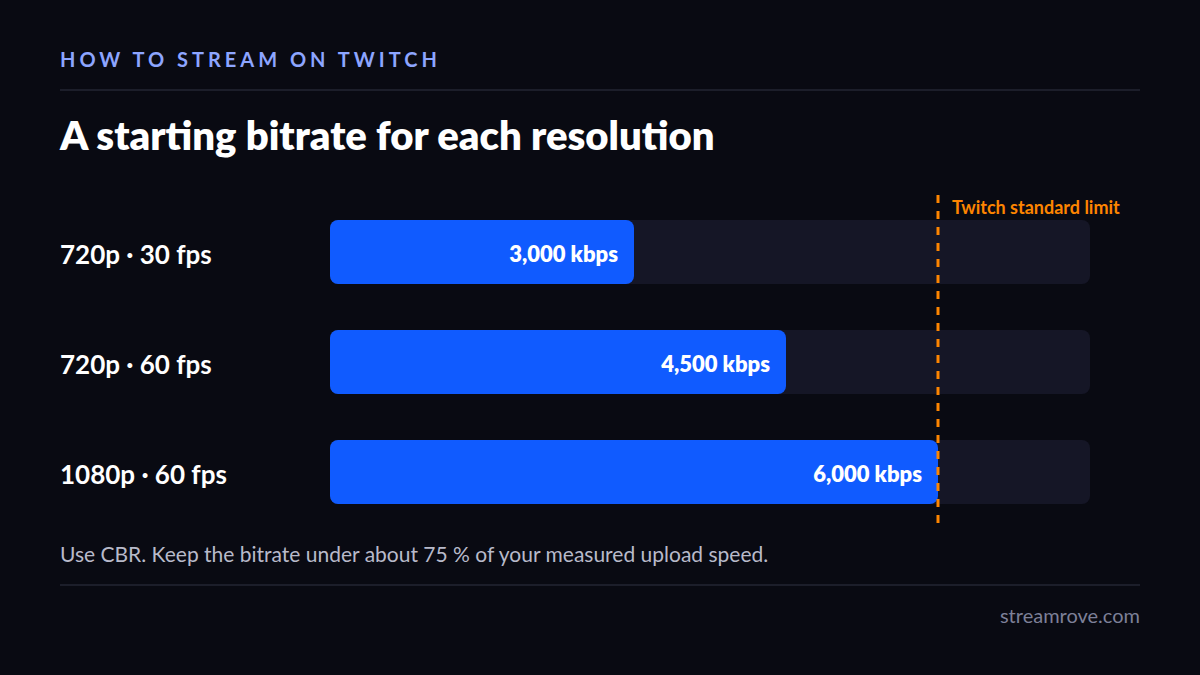
Keep it under about 75 % of your measured upload speed. The bitrate calculator does that maths for you. Use CBR (constant bitrate), which is what Twitch expects.
Keyframe interval
Set it to 2. OBS's default of 0 lets the encoder choose, and with x264 at 30 fps that is about 8 seconds. Twitch then has trouble making clips and quality options, and viewers wait longer for the picture to start. Our keyframe interval guide has the details and what we measured.
Resolution
In Settings → Video, a base resolution of 1920×1080 and an output of 1280×720 is a safe start. 720p at 60 fps looks better than 1080p at a bitrate the connection can barely hold.
Newer OBS versions also offer Twitch Enhanced Broadcasting, which encodes several quality levels on your own computer. It needs a recent NVIDIA, AMD or Intel graphics card, and Twitch changes its limits often, so read the current rules in OBS before you switch it on.
Before you press Start Streaming
Record 30 seconds locally with Start Recording and watch it back. This catches the usual first-stream problems: game audio missing, microphone too quiet, the wrong window captured. The mic test checks your microphone in the browser.
Then start the stream and open your channel in another browser with the sound muted. If the picture shows up and stays smooth, you're live.
When Twitch says you are dropping frames
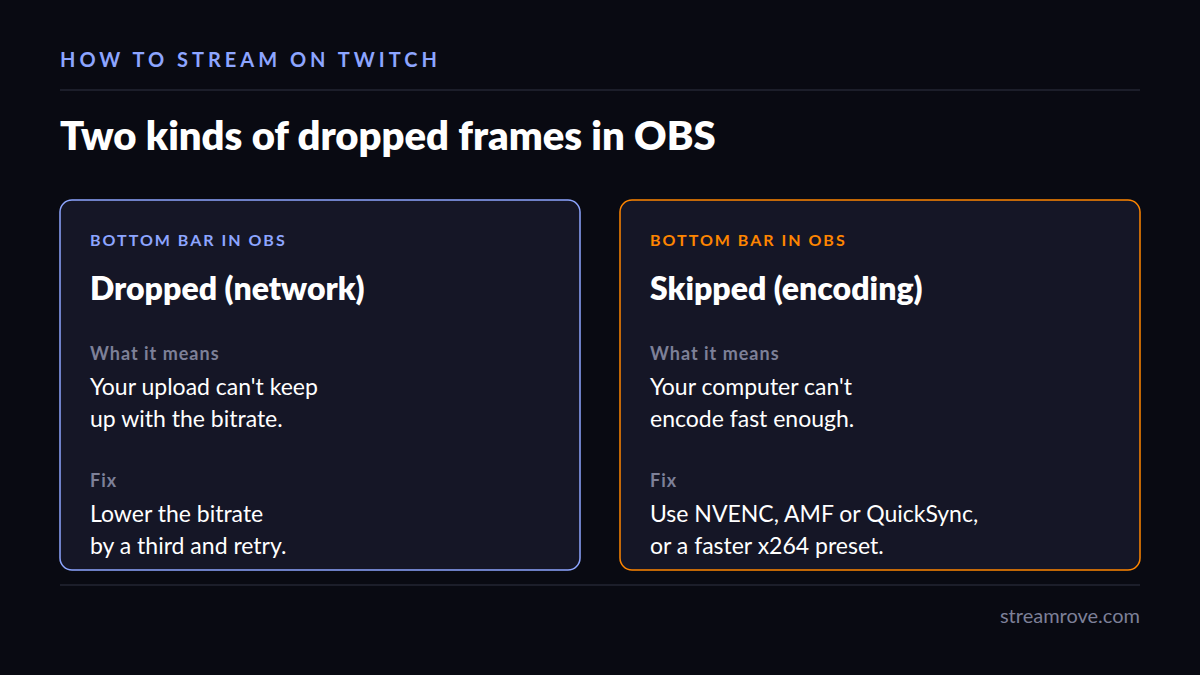
OBS shows two kinds of dropped frames at the bottom of the window. "Dropped frames (network)" means your upload can't keep up: lower the bitrate. "Skipped frames (encoding)" means your computer can't encode fast enough: switch to your graphics card's encoder (NVENC, AMF or QuickSync) or pick a faster x264 preset.
Reach more viewers than Twitch alone
Twitch lets streamers send the same broadcast to other services, and many stream to YouTube or Kick at the same time to reach people who never open Twitch. Our YouTube and Twitch page explains the rules.
StreamRove does the sending: OBS sends one stream to us, and we pass it on to Twitch, YouTube, Kick and others, so your upload carries one stream instead of three. The free Sandbox plan has two destinations, five output hours a month, broadcasts of up to an hour, and a watermark. No card needed.
Common questions
What do I need to become a Twitch Affiliate? Twitch asks for 50 followers and, within 30 days, 8 hours of streaming on 7 different days with an average of 3 viewers. It invites you automatically when you meet the bar.
Can I stream to Twitch from a phone? Yes, from the Twitch app, but you can't add scenes or overlays. For a gaming stream, use a computer.
Is OBS the only option? No. Streamlabs, vMix and browser studios all work. StreamRove's Studio streams from a browser tab, with screen sharing and guests.